No products in the cart.
Preventing Stepper Motor Driver Burnout: Essential Considerations for Industrial CNC

Contents
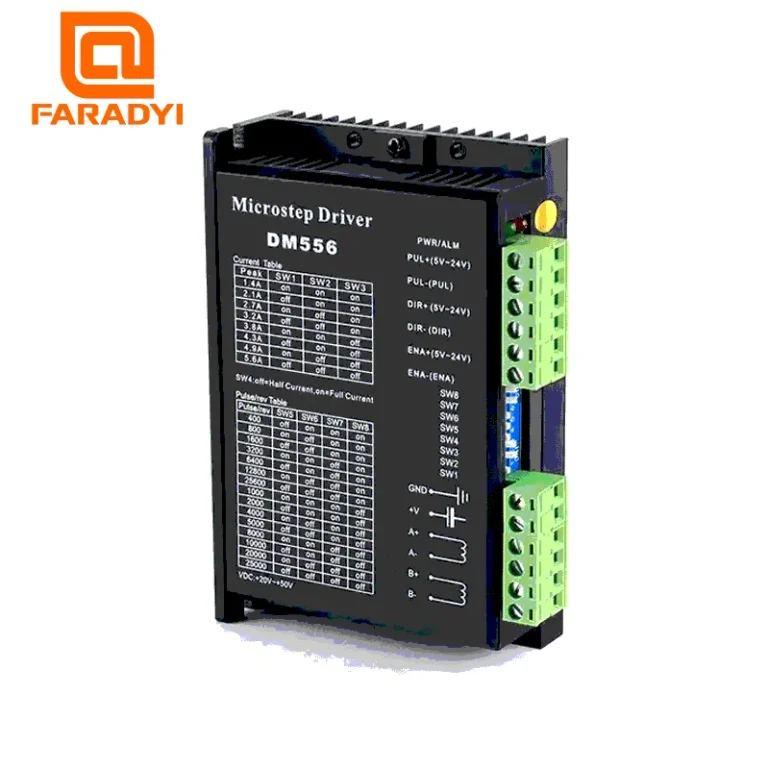
Stepper motor drivers are crucial for precise motion control in industrial automation. However, they are susceptible to damage from incorrect settings, poor cooling, or improper wiring. Understanding key parameters like current and voltage, ensuring adequate heat dissipation, and using quality components are vital to prevent burnout and ensure the longevity and reliability of your CNC machinery.
Mermak CNC Technical Guide
Practical notes for CNC router, automation and industrial motion systems.
Understanding Stepper Motor Drivers and Burnout Risks
Stepper motor drivers are the brains behind the precise, step-by-step movements of stepper motors in industrial automation. They translate control signals into power pulses that drive the motor’s coils. However, these essential components can be surprisingly fragile. A “burned-out” driver typically means its internal electronic components have failed due to excessive current, voltage, or heat. This failure can halt production, leading to costly downtime and repairs. Proactive measures are essential to protect your investment and ensure consistent performance from your CNC router machine.
Key Technical Parameters for Driver Longevity
Modern stepper motor drivers often feature microstepping, which divides each full step into smaller increments for smoother, more precise motion. The most critical parameter for driver health is current control. Drivers use Pulse Width Modulation (PWM) to regulate current, preventing it from exceeding the motor’s or driver’s rated limits. This prevents overheating. The driver’s operating voltage is also crucial; exceeding the specified range can instantly damage the driver’s internal circuitry.
For optimal performance and longevity, the motor’s nominal current, inductance, and voltage requirements must align with the driver’s capabilities. The driver’s maximum output current should be set to match the motor’s rated current, typically between 70-90%, to balance torque and heat. While higher supply voltages can enable higher motor speeds and torque, they also increase the thermal load on the driver. Therefore, selecting a supply voltage within the driver’s specified range and considering the motor’s inductance is key. Low-inductance motors often benefit from higher voltages but require robust cooling solutions.
| Parameter | Description |
|---|---|
| Max Output Current | The highest current the driver can supply to the motor windings (Amps). Must not exceed motor’s rated current. |
| Input Voltage Range | The minimum and maximum supply voltage for safe operation (Volts). |
| Microstepping Options | Divisions per full step (e.g., 1/2, 1/4, 1/16, 1/256). Higher values yield smoother motion. |
| Thermal Protection | Built-in feature to shut down the driver if its internal temperature exceeds safe limits. |
| Motor Inductance Compatibility | The range of motor inductance (mH) the driver is designed to work with efficiently. |
| Driver Type | Typically Bipolar; most modern drivers support bipolar motors. |
| IP Rating | Ingress Protection rating, indicating resistance to dust and moisture. |
Practical Considerations for Industrial Environments
- Correct Current Setting: A common cause of driver failure is setting the current too high. Use the driver’s DIP switches or potentiometers to set the current to 70-90% of the motor’s nominal rating. For a 2A motor, setting the driver to 1.5A-1.8A is often appropriate. Consult the manufacturer’s datasheet for precise recommendations.
- Appropriate Voltage Supply: Never exceed the driver’s specified input voltage range. Overvoltage can instantly destroy the driver’s power components. Ensure your power supply is stable and provides sufficient current. Higher voltages can improve high-speed performance but increase heat; match the voltage to the motor’s inductance and the driver’s thermal capacity.
- Adequate Cooling: Stepper motor drivers generate significant heat, especially under heavy loads. Ensure proper ventilation for the control cabinet. For high-current applications, active cooling (fans) or substantial heatsinks are essential. Ambient temperature must be within the driver’s operating limits to prevent thermal shutdown or permanent damage.
- Quality Wiring and Connections: Use appropriately sized wires for motor and power supply connections to minimize voltage drop and resistance. Ensure all connections are secure and properly insulated. Poor connections can lead to intermittent operation, increased resistance, and heat buildup, potentially damaging the driver or motor. Shielded cables are recommended in electrically noisy industrial environments to prevent interference.
- Motor and Driver Compatibility: Always verify that the stepper motor’s electrical specifications (voltage, current, inductance) are compatible with the chosen driver. Using a motor with significantly higher current or inductance than the driver can handle is a recipe for failure. Refer to datasheets for both components. For example, a Nema 34 stepper motor requires a more powerful driver than a Nema 23 motor.
- Environmental Factors: Protect the driver from excessive dust, moisture, and vibration. Ensure the mounting location is clean and stable. Consider the driver’s IP rating for protection against environmental contaminants.
Conclusion
Preventing stepper motor driver burnout is paramount for the reliable operation of any industrial CNC system. By carefully considering current and voltage settings, ensuring adequate cooling, using quality wiring, and verifying component compatibility, you can significantly extend the lifespan of your drivers and avoid costly downtime. Always consult the technical documentation for your specific motor and driver models.
For expert advice on selecting the right stepper motor and driver solutions for your CNC router machine, or to request a quote, contact us on WhatsApp!