




































































How to Diagnose Stepper Motor Driver Faults: A Field Guide for Industrial Professionals
📑 Table of contents (Click to open)
How to Diagnose Stepper Motor Driver Faults: A Field Guide and Technical Article
Introduction and Technical Analysis
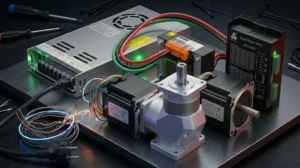
Stepper motors are indispensable components in industrial automation systems, playing critical roles in applications requiring precise positioning and speed control. The fundamental element ensuring their accurate and reliable operation is the stepper motor driver. In robotic arms, CNC machines, 3D printers, conveyor systems, and many other automation applications, a malfunction of stepper motor drivers can lead to significant disruptions in production processes, costly downtime, and even system damage. This technical article and field guide aim to simplify on-site troubleshooting for industrial automation professionals by thoroughly examining the symptoms, causes, and systematic diagnostic methods for stepper motor driver faults. Correctly understanding a stepper motor driver fault is vital for rapid intervention, minimal production loss, and maintaining system reliability. Due to their complex electronic structures and high-performance expectations, diagnosing driver faults often requires specific technical knowledge and experience. This guide combines both theoretical knowledge and practical field experience to provide a comprehensive roadmap for fault detection and resolution.
Operating Principle and Technical Data
Stepper motors are brushless DC motors that convert electrical signals into precise angular mechanical rotation. These motors typically have multiple windings (phases), and each phase is energized in a specific sequence to make the motor advance step by step. A stepper motor driver is an electronic circuit that applies the correct current and voltage to these phase windings, in the correct sequence and at the correct time. The primary function of the driver is to receive step and direction signals from a controller (PLC, microcontroller, etc.) and send appropriate current pulses to the motor windings. Modern stepper motor drivers often feature microstepping. This feature allows the motor’s full steps to be divided into smaller increments, resulting in smoother motion, higher resolution, and reduced vibration. Microstepping is achieved by modulating the current applied to the motor windings in a sinusoidal form. Additionally, drivers use PWM (Pulse Width Modulation) based chopper circuits to regulate the motor’s nominal current. This overcomes delays caused by the motor’s inductive nature and ensures sufficient torque even at high speeds. Driver protection features include overcurrent, overvoltage, overtemperature, and short-circuit protections. These protections are critical for extending the lifespan of both the driver and the motor. The driver’s energy efficiency, thermal management, and electromagnetic compatibility (EMC) are also important technical parameters for reliable operation in industrial environments. Proper driver selection must consider the motor’s nominal current, supply voltage, and desired speed and torque requirements. An incompatible driver can degrade motor performance or lead to premature failures.
| Parameter | Value/Description |
|---|---|
| Input Voltage (DC) | 9V – 80V DC (Varies by driver model, typically 24V-48V) |
| Output Current (Per Phase) | 0.5A – 8.0A RMS (Adjustable according to motor current and driver power) |
| Microstepping Resolution | 1/2, 1/4, 1/8, 1/16, 1/32, 1/64, 1/128, 1/256 (Must be checked against manufacturer datasheet) |
| Protection Features | Overcurrent, Overvoltage, Overtemperature, Short Circuit, Motor Open Circuit |
| Control Signals | STEP/PULSE, DIR/DIRECTION, ENABLE (Typically 5V TTL or 24V PLC compatible) |
| Operating Temperature Range | -10°C to +55°C (Varies according to ambient conditions and driver model) |
| Suitable Motor Inductance | 0.5mH – 20mH (Depends on the driver’s chopper frequency and performance) |
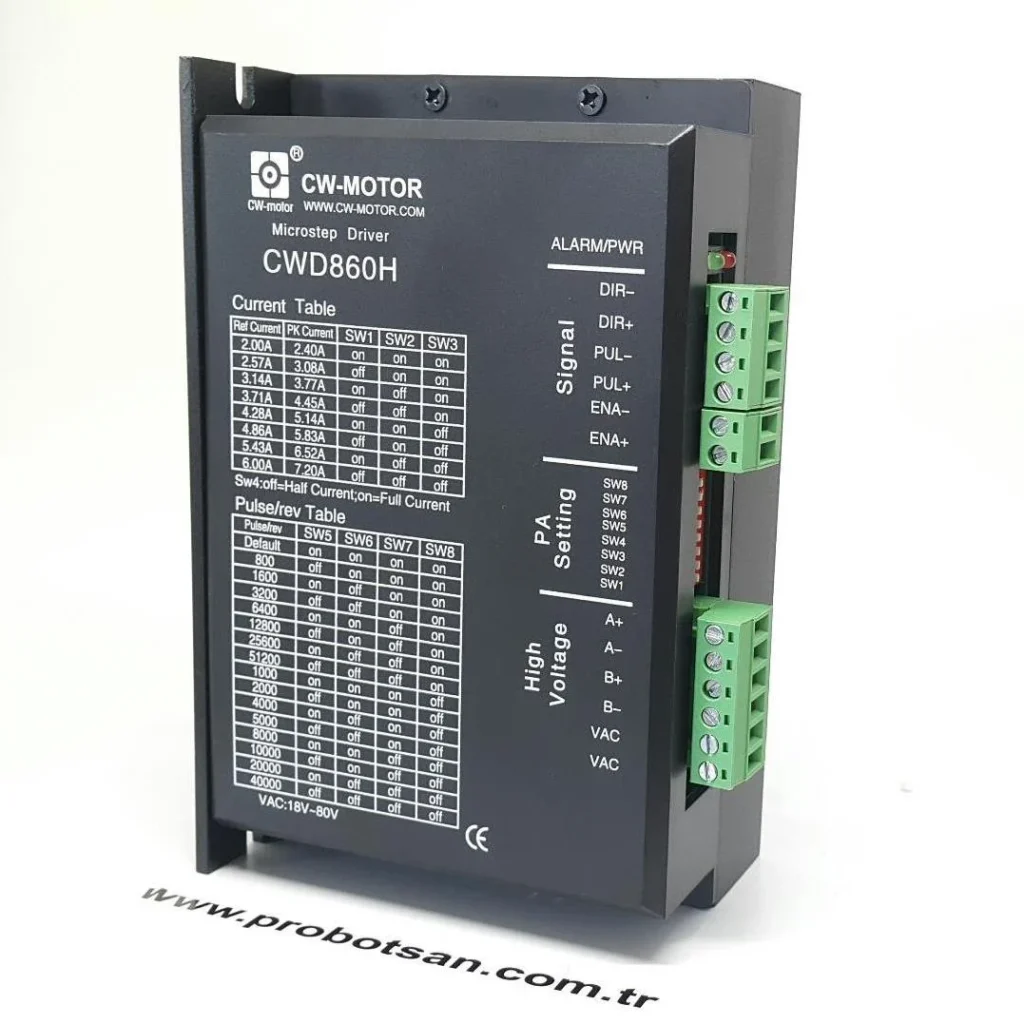
Field Considerations for Stepper Motor Drivers
- Safety Precautions and ESD Protection: Stepper motor drivers operate with high voltages and currents, so it is essential to always cut off the system’s power supply and wait for the discharge time before any intervention. It is mandatory to use appropriate personal protective equipment (PPE) against the risk of electric shock. Furthermore, it is crucial to remember that drivers and other electronic components are sensitive to electrostatic discharge (ESD). Preventing ESD damage by using anti-static wrist straps and work surfaces extends the life of drivers and prevents erroneous diagnoses.
- Environmental Conditions Assessment: The temperature, humidity, dust, and vibration levels of the environment in which the driver operates directly affect its lifespan and performance. Excessive temperature can cause rapid aging of the driver’s internal components and trigger overtemperature protection, leading to motor shutdown. High humidity or dust can cause short circuits or corrosion. Vibration can loosen connections or crack solder joints on the board. Checking whether the driver is operating within its specified operating conditions is one of the first steps in fault diagnosis.
- Cable Quality, Connections, and Grounding: The quality, length, and correct connection of power cables and control signal cables between the driver and the motor are critically important. Poor quality or damaged cables can create high resistance, voltage drop, signal loss, or electromagnetic interference (EMI). All connections must be tight and have the correct pinout. Ensuring that motor phase connections are made in the correct sequence is essential for smooth motor operation. Additionally, proper grounding of the driver and the overall system prevents noise-induced errors and ensures safety. Poor grounding can lead to control signal corruption and unstable driver operation.
- Motor and Driver Compatibility: When selecting a stepper motor driver, parameters such as the motor’s nominal current, voltage, inductance, and step angle must be considered. The driver’s output current capacity should be set to meet or slightly exceed the motor’s nominal current. Too low a current can cause the motor to lose torque, while too high a current can lead to overheating of the motor or driver. The motor’s inductance must be compatible with the driver’s chopper frequency; otherwise, torque drops may occur at high speeds. Ensure that DIP switch or software settings for microstepping and current adjustments on the driver are correctly configured according to motor and application requirements.
- Thermal Management and Cooling: Stepper motor drivers generate a significant amount of heat, especially when operating at high currents. Adequate cooling must be provided to dissipate this heat effectively. Ensure that the driver’s heatsink and/or fan (if present) are clean and unobstructed. Check if the fan is operating and if the airflow is sufficient. Insufficient cooling can trigger the driver’s internal temperature protection, leading to motor shutdown or permanent damage. Sufficient clearance should be left around the driver for adequate air circulation.

Common Problems and Solutions for Industrial Stepper Motor Drivers
Stepper motor driver faults typically manifest with specific symptoms. Correctly interpreting these symptoms helps quickly identify the source of the fault.
- Motor Not Turning or Not Moving at All:
- Power Supply Check: Check the DC supply voltage to the driver with a multimeter. Ensure the voltage is within the driver’s specified range and stable. Verify that the power supply’s current capacity is sufficient. Low voltage or insufficient current can cause the driver not to operate at all.
- Control Signals (STEP, DIR, ENABLE): Check with an oscilloscope if the STEP (pulse), DIR (direction), and ENABLE (enable) signals from the controller are reaching the driver. Ensure the ENABLE signal is at the correct logic level (usually active low or active high). Check for breaks or short circuits in the signal cables.
- Motor Connections: Ensure that the motor phase windings are connected to the driver in the correct sequence and securely. A break or incorrect connection in the phase connections can cause the motor not to turn or only to vibrate. Check the motor windings with a multimeter for open circuits or short circuits.
- Driver Status LEDs and Error Codes: Many drivers have LEDs that indicate operating status and faults. Check the status of these LEDs (e.g., power, error, overheating). If the driver has a display or communication port, read the error codes and interpret them according to the manufacturer’s manual.
- Overcurrent/Overtemperature Protection: The driver’s overcurrent or overtemperature protection may have been triggered. Check if the driver’s current setting is appropriate for the motor. Manually check if the motor or driver is overheating (be careful, there may be a risk of burns). Insufficient cooling or motor jamming can lead to this situation.
- Motor Vibrates, Misses Steps, or Experiences Torque Loss:
- Current Setting and Microstepping: Ensure that the current setting on the driver is appropriate for the motor’s nominal current. Too low a current will cause the motor to not produce enough torque and lose steps. Verify that the microstepping settings are compatible with the controller. Incorrect microstepping settings can cause the motor to step incorrectly.
- Load Mismatch: Check if the mechanical load applied to the motor exceeds the motor’s torque capacity. Excessive load will cause the motor to lose steps. Examine the mechanical system for friction, jamming, or misalignment.
- Noise and Interference (EMI): Ensure that control signal cables are kept away from power cables or other noise sources. Poorly shielded or long signal cables can be susceptible to EMI, generating erroneous step signals. Adding ferrite beads to signal lines or using shielded cables can be beneficial.
- Motor Phase Fault: There may be an internal short circuit, open circuit, or insulation breakdown in one of the motor windings. Measure the resistance and inductance of the motor windings with a multimeter or LCR meter and compare them with manufacturer values.
- Driver Overheating:
- Current Setting: Check if the driver’s current setting is higher than necessary for the motor. The current should be set according to the motor’s nominal current.
- Cooling: Ensure that the driver’s heatsink is clean and that its fan (if present) is working properly. Check if the cabinet’s internal air circulation is sufficient. If the ambient temperature is too high, consider additional cooling solutions.
- Motor Impedance: If the motor’s impedance is too low for the driver, the driver will try to draw more current, leading to overheating. Re-evaluate motor and driver compatibility.
- Short Circuit: A partial short circuit in the motor windings or output cables can cause the driver to draw excessive current and overheat.
- Driver Completely Dead (No Power):
- Input Voltage: Check if the input voltage to the driver is completely cut off. A fuse may have blown.
- Internal Fuse: Some drivers have internal fuses. Check if this fuse has blown. However, a blown fuse usually indicates a more serious underlying problem (e.g., a short circuit).
- Permanent Fault: A permanent fault may have occurred in the driver’s power input stage or main control circuit (e.g., MOSFET failure, control chip failure). In this case, the driver may need to be repaired or replaced. Visually inspect for burn marks or swollen capacitors.
Expert Advice
Diagnosing and resolving stepper motor driver faults are complex but solvable problems encountered in industrial automation. A systematic approach, accurate measurement tools (multimeter, oscilloscope), and familiarity with the manufacturer’s technical documentation (datasheet, user manual) are vital for successful fault detection. Safety should always be the highest priority; no intervention should be made without cutting off power and taking necessary safety precautions. Subsequently, fundamental elements such as environmental factors, cable connections, motor-driver compatibility, and thermal management should be checked. LED indicators and error codes on the driver will provide initial clues, guiding the troubleshooting process. The list of common problems will help narrow down possible scenarios. It should be remembered that many faults can stem from a simple connection error, incorrect parameter setting, or an environmental factor. Therefore, ensure all simple checks are meticulously performed before replacing an expensive component. If the problem persists despite all checks, and physical damage (burn marks, swollen components) is observed on the driver, the driver may need to be repaired or replaced. Regular preventive maintenance, periodic system checks, and operator training are the best investments to prevent driver faults and maintain production efficiency. Field experience is an invaluable asset gained over time in diagnosing such faults; this guide has been prepared to reinforce this experience and enable new experts to adapt quickly.
FAQ
What is the primary function of a stepper motor driver in an industrial setup?
A stepper motor driver converts digital step and direction signals from a controller into electrical pulses that energize the motor's windings in a precise sequence. This controlled current flow causes the stepper motor to rotate in discrete steps, enabling accurate positioning and speed control in industrial applications.
What are the most common signs of a stepper motor driver malfunction?
Common symptoms include the motor not moving at all, vibrating excessively, losing steps, making unusual noises, or the driver itself overheating. Checking the driver's status LEDs for error codes is often the first step in identifying the problem.
What are the initial troubleshooting steps when a stepper motor driver fails to operate?
First, ensure the power supply voltage is stable and within the driver's specified range. Verify that the STEP, DIR, and ENABLE control signals are correctly transmitted from the controller. Check all motor phase connections for breaks or short circuits. Inspect for proper grounding and ensure the driver's current settings are appropriate for the motor. Finally, check for any environmental factors like overheating or excessive vibration.
Why would a stepper motor driver overheat, and how can it be prevented?
Overheating can be caused by an excessively high current setting for the motor, insufficient cooling (blocked heatsink or non-functional fan), or a mismatch between the motor's impedance and the driver. A partial short circuit in the motor windings or output cables can also lead to the driver drawing excessive current and overheating.
My stepper motor is vibrating or losing steps. What could be the cause?
If the motor is vibrating or losing steps, check the driver's current and microstepping settings for compatibility with the motor and controller. Assess if the mechanical load on the motor exceeds its torque capacity. Also, inspect control signal cables for electromagnetic interference (EMI) from power lines, which can cause erroneous step signals.