No products in the cart.
Best Free CNC Drawing Programs and CAM Software List for Industrial Use
Contents
- Introduction and Technical Analysis The industrial automation and manufacturing sectors are constantly seeking efficiency, precision, and cost-effectiveness in today’s competitive market. In this pursuit, Computer-Aided Design (CAD) and Computer-Aided Manufacturing (CAM) software stand as the heart and brain of CNC (Computer Numerical Control) machines. CAD software enables engineers and designers to model products digitally in two-dimensional (2D) or three-dimensional (3D environments, while CAM software takes these digital models and converts them into command sequences known as G-code, which CNC machines can understand. This integration makes it possible to produce complex geometries with high precision. For small and medium-sized enterprises (SMEs), entrepreneurs, hobbyists, and educational institutions, the high costs of commercial software can be a significant barrier. Here, free CNC drawing programs and CAM software play a critical role by democratizing access to technology, fostering innovation, and promoting learning. This field guide will provide an in-depth analysis of the best free solutions available for industrial automation professionals, comprehensively covering the technical details and field applications to consider when making a selection. Our goal is to guide users who wish to optimize their production processes by overcoming cost barriers. Operating Principles and Technical Data
- Field Considerations for Industrial CNC Router Operations
- Common Issues and Solutions for Free CNC Software
- Expert Advice for Industrial CNC Router Users
- FAQ
Introduction and Technical Analysis
The industrial automation and manufacturing sectors are constantly seeking efficiency, precision, and cost-effectiveness in today’s competitive market. In this pursuit, Computer-Aided Design (CAD) and Computer-Aided Manufacturing (CAM) software stand as the heart and brain of CNC (Computer Numerical Control) machines. CAD software enables engineers and designers to model products digitally in two-dimensional (2D) or three-dimensional (3D environments, while CAM software takes these digital models and converts them into command sequences known as G-code, which CNC machines can understand. This integration makes it possible to produce complex geometries with high precision. For small and medium-sized enterprises (SMEs), entrepreneurs, hobbyists, and educational institutions, the high costs of commercial software can be a significant barrier. Here, free CNC drawing programs and CAM software play a critical role by democratizing access to technology, fostering innovation, and promoting learning. This field guide will provide an in-depth analysis of the best free solutions available for industrial automation professionals, comprehensively covering the technical details and field applications to consider when making a selection. Our goal is to guide users who wish to optimize their production processes by overcoming cost barriers.
Operating Principles and Technical Data
Free CAD and CAM software primarily offer the functionality of their commercial counterparts, often under open-source philosophies or personal use licenses. At the beginning of a CNC machining process, a digital model of a product or part is created using CAD software. This model includes the part’s geometry, dimensions, and features. Software like FreeCAD and LibreCAD offer fundamental CAD functions such as solid modeling, surface modeling, and assembly design. Users can create 2D drawings or design 3D models using these programs. Once the design process is complete, this CAD model is transferred to CAM software. The CAM software makes decisions on how the part will be machined: which tool will be used, tool path strategies (e.g., roughing, finishing, drilling, pocketing), feed rates, spindle speeds, and cutting depths are determined at this stage. Using these parameters, the CAM software calculates the tool’s trajectory relative to the part and translates this trajectory into G-code format. G-code is a standard language interpreted by the CNC machine’s control unit, controlling the machine’s axes, tool movements, spindle speed, and other machining functions. For example, Fusion 360’s personal use version or FreeCAD’s Path Workbench module offer such CAM functionality for free. Software like Estlcam stands out with user-friendly interfaces, especially for hobby and small-scale CNC routers. The transfer of G-code to the machine is typically done via a serial port, USB connection, or over a network. G-code sender software like Universal Gcode Sender (UGS) or Candle facilitate this communication and also provide control functions such as monitoring, pausing, or starting the machining process. The performance of these software solutions depends on the computer’s hardware specifications, the complexity of the model, and the software’s optimization. Especially 3D models and complex tool paths may require more processing power and memory. Open-source software generally benefits from extensive community support, continuous development, and bug fixes. This allows users to find quick solutions to problems they encounter and customize the software according to their needs.
| Parameter | Value/Description |
|---|---|
| Software Name (Example) | FreeCAD |
| Software Type | Parametric 3D CAD Model and CAM (Path Workbench) |
| Supported Operating Systems | Windows, macOS, Linux |
| Key Features | Solid modeling, assembly, technical drawing, simulation, 2.5D/3D CAM functionality with Path Workbench, modular structure |
| Target Audience | Engineers, designers, hobbyists, educational institutions, small businesses |
| Learning Curve | Medium to High (Requires knowledge of parametric modeling and CAM) |
| License Type | GNU Lesser General Public License (LGPL) – Open Source |
| Output Formats | STEP, IGES, OBJ, STL, DXF, SVG, G-code (various post-processors with Path Workbench) |
Field Considerations for Industrial CNC Router Operations
- Post-Processor Compatibility and Accuracy: Each CNC machine’s control unit expects G-code in a specific dialect and format. Selecting the correct post-processor is critical for your machine to understand the G-code generated by the CAM software. An incorrect post-processor can lead to erroneous machine movements, tool breakage, or part damage. Generally, free software comes with standard post-processors, but customization or manual editing may be required for specialized machines. This is one of the most important technical details in the field.
- Tool Path Optimization and Cutting Parameters: For an efficient machining process, optimizing tool paths and correctly setting cutting parameters (feed rate, spindle speed, cutting depth) is essential. Material type, tool material, tool geometry, and machine rigidity directly influence these parameters. Incorrect parameters can result in poor surface quality, reduced tool life, excessive vibration, or machine malfunctions. While free software often offers basic optimization options, advanced strategies may require user experience and manual intervention.
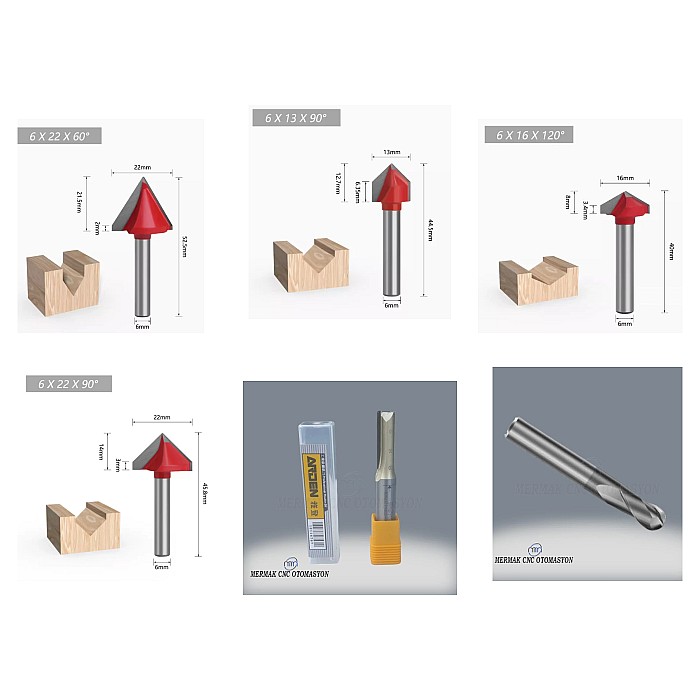
- Material Knowledge and Tool Selection: The physical and mechanical properties of the material to be machined (hardness, abrasiveness, thermal conductivity) determine tool selection and machining strategy. For example, tools and parameters used for machining aluminum differ from those used for steel or wood. The correct tool geometry, coating, and diameter have a significant impact on machining efficiency and part quality. An accurate and up-to-date tool library defined in the CAM software is essential for field success.
- Machine Calibration and Maintenance: Regular calibration and maintenance of the CNC machine’s mechanical and electronic components ensure machining precision and repeatability. Correctly setting parameters such as backlash, tool length offsets, and work offsets is vital for a seamless transition from the CAD model to the CAM software and then to the physical part. Free software requires these calibration data to be used accurately.
- Machining Simulation and Dry Run: Before actual machining begins, visually verifying tool paths using simulation tools provided by the CAM software or external G-code simulators can prevent potential collisions or errors. Additionally, performing a dry run at low speed on the machine without a workpiece and tool is a critical step to understand the G-code’s behavior on the machine and detect unexpected issues. This is particularly important when using a new post-processor or a complex machining strategy.
- Community Support and Documentation: Free and open-source software typically does not offer as comprehensive official support as commercial software. However, active user communities, forums, and online documentation are important resources for finding solutions to problems and fully utilizing the software’s potential. Field professionals’ ability to effectively use these resources accelerates the learning process and increases operational efficiency.
Common Issues and Solutions for Free CNC Software
When using free CNC CAD/CAM software, it is natural to encounter some issues, especially during the initial stages or with complex projects. Recognizing these issues and knowing appropriate solutions minimizes disruptions in the production process.
- Incorrect G-Code Output or Machine Errors:
- Issue: G-code generated from the CAM software causes unexpected movements, tool crashes, or machine errors.
- Solution: This usually results from using an incorrect or incompatible post-processor. Ensure you have selected the correct post-processor specific to your machine’s control unit and model. If necessary, search for a suitable post-processor in the software’s community forums or manufacturer documentation. Manually inspect the G-code file to identify incompatibilities with your machine’s supported command set. Perform G-code verification with simulation software.
- Tool Breakage or Material Damage:
- Issue: Tool breakage, material burning, or excessive deformation occurs on the surface during machining.
- Solution: This problem typically stems from incorrect cutting parameters (feed rate, spindle speed, cutting depth) or improper tool selection. Double-check cutting parameters suitable for your material and tool (via manufacturer recommendations, cutting tables, or online calculators). Verify the tool’s sharpness and proper clamping. Review the use of coolant. Ensure the tool path strategy (e.g., gradual passes instead of overly deep passes) is appropriate.
- Poor Surface Quality or Dimensional Errors:
- Issue: The machined part’s surface is rough, wavy, or shows deviations from expected dimensions.
- Solution: Surface quality issues often result from inadequate finishing pass strategies, unsuitable tools, excessive tool vibration, or insufficient machine rigidity. Improve surface quality by using smaller stepovers, higher spindle speeds, and appropriate finishing tools. For dimensional errors, check machine calibration (backlash, tool length offsets, workpiece zero point). Tool deflection or material deformation can also lead to such errors.
- Software Performance Issues or Crashes:
- Issue: The software slows down, freezes, or unexpectedly closes, especially when working on complex models.
- Solution: This usually occurs due to insufficient computer hardware resources (RAM, processor, graphics card). Check the software’s system requirements. Keep your operating system and graphics card drivers updated. You can improve performance by breaking down large models into smaller parts or working with simpler geometries. In open-source software, updates to the latest stable version often include performance improvements.
- Learning Difficulty and Lack of Documentation:
- Issue: The software interface seems complex, a specific feature cannot be found, or sufficient English resources are unavailable.
- Solution: The learning curve for free software can sometimes be steeper. Actively use the software’s official documentation, online tutorial videos, and user forums. Most open-source software has a large global community; seeking help from these communities is often quick and effective. Learn the basic principles by practicing on small and simple projects, and gradually move on to more complex tasks.
Expert Advice for Industrial CNC Router Users
CNC technologies, fundamental to industrial automation and modern manufacturing, are inconceivable without CAD and CAM software. As detailed in this guide, free CNC drawing programs and CAM software offer invaluable alternatives to high-cost commercial solutions, especially for entry-level users, hobbyists, educational institutions, and small businesses with budget constraints. FreeCAD’s modular structure and comprehensive Path Workbench, Fusion 360’s personal use version’s integrated CAD/CAM capabilities, and the simplicity of tools like Estlcam demonstrate that there is a solution for every need. The basic functionality offered by these software packages is sufficient for successfully completing many projects and allows users to acquire critical skills such as G-code generation, tool path strategy determination, and CNC machine control.
However, the use of free software can also present some challenges. Issues such as post-processor compatibility, the absence of advanced features, or less comprehensive technical support compared to commercial software are important points that field professionals should consider. Therefore, when making a selection, it is essential to take into account your project requirements, machine specifications, and your own technical knowledge. As expert advice, it is recommended to try several different free software options initially and familiarize yourself with their interfaces, workflows, and community support. Especially the community forums and online documentation offered by open-source software will be your greatest aid in finding solutions to problems you encounter and fully utilizing the software’s potential. Remember that the knowledge and experience of the person using the software are as decisive as the software itself in terms of machining quality and efficiency. Continuous learning, practice, and staying updated with current developments are the keys to success in this field. Free CAD/CAM solutions offer an excellent starting point for stepping into the world of industrial automation or expanding your existing capabilities.
FAQ
What are the primary benefits of using free CAD/CAM software for industrial CNC applications?
Free CAD/CAM software allows industrial users to design parts (CAD) and generate G-code for CNC machines (CAM) without the high cost of commercial licenses. This democratizes access to advanced manufacturing tools, enabling small businesses, startups, and educational institutions to innovate and produce with CNC router machines, laser cutters, and other industrial CNC equipment.
What essential features should industrial B2B buyers consider in free CNC drawing and CAM software?
Key features to look for include robust 2D/3D modeling capabilities, a comprehensive tool library, various tool path strategies (e.g., roughing, finishing, drilling), G-code generation with customizable post-processors, and simulation tools. Compatibility with your specific industrial CNC router machine and its control system is also crucial.
What are the common challenges when implementing free CAD/CAM software in an industrial CNC environment?
Common challenges include post-processor compatibility issues with specific CNC machine controls, a steeper learning curve compared to some commercial alternatives, and potentially less comprehensive official technical support. However, active online communities and extensive documentation often provide excellent resources for troubleshooting and learning.
How can I ensure G-code generated by free CAM software is compatible with my industrial CNC router machine?
To ensure G-code compatibility, always verify that the CAM software's post-processor is configured for your specific CNC machine's control unit (e.g., Mach3, GRBL, Fanuc). Perform dry runs and simulations before actual machining. Consult community forums or machine manufacturers for recommended post-processors or customization guidelines.
Which free CNC drawing programs and CAM software are highly recommended for industrial B2B users?
Popular free options include FreeCAD (with its Path Workbench for CAM), Fusion 360 (personal use license for integrated CAD/CAM), LibreCAD (for 2D CAD), and Estlcam (user-friendly CAM for hobby and small CNC routers). Universal Gcode Sender (UGS) and Candle are excellent free G-code senders.