
No products in the cart.
How to Repair and Voltage Test a CNC Laser Power Supply
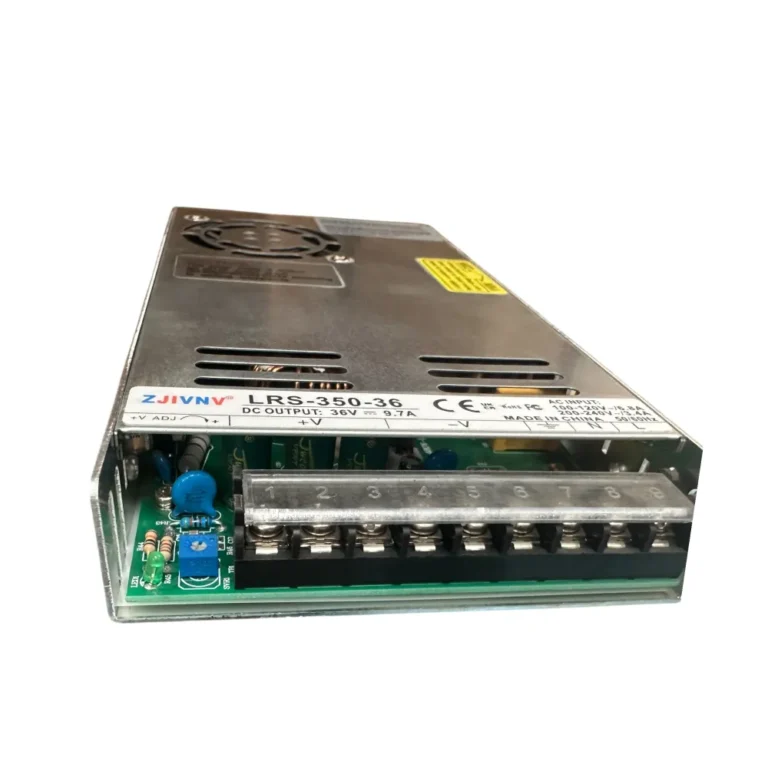
Contents
- Introduction and Technical Analysis In the industrial automation sector, CNC laser systems are indispensable components of modern manufacturing. At the heart of these systems, laser power supplies (LPS) ensure precise and efficient cutting, engraving, marking, and welding operations by providing the correct voltage and current to the laser tube or diode. A malfunction in a laser power supply can lead to significant downtime, costly delays, and production losses across the entire manufacturing line. Therefore, accurate and safe fault detection, repair, and voltage testing of these critical components are vital for field engineers and technicians. This guide offers a comprehensive resource for professionals working in industrial automation environments, covering the fundamental operating principles of CNC laser power supplies, detailed fault detection, safe repair procedures, and critical voltage testing steps. Our objective is to empower technical teams in the field to better understand these complex systems, provide quick and effective solutions to malfunctions, and thus maximize operational continuity. Absolute adherence to safety protocols when working with these high-voltage and high-current systems will always be the top priority. Operating Principle and Technical Data
- Field Considerations
- Common Problems and Solutions
- Expert Advice
- FAQ
Introduction and Technical Analysis
In the industrial automation sector, CNC laser systems are indispensable components of modern manufacturing. At the heart of these systems, laser power supplies (LPS) ensure precise and efficient cutting, engraving, marking, and welding operations by providing the correct voltage and current to the laser tube or diode. A malfunction in a laser power supply can lead to significant downtime, costly delays, and production losses across the entire manufacturing line. Therefore, accurate and safe fault detection, repair, and voltage testing of these critical components are vital for field engineers and technicians. This guide offers a comprehensive resource for professionals working in industrial automation environments, covering the fundamental operating principles of CNC laser power supplies, detailed fault detection, safe repair procedures, and critical voltage testing steps. Our objective is to empower technical teams in the field to better understand these complex systems, provide quick and effective solutions to malfunctions, and thus maximize operational continuity. Absolute adherence to safety protocols when working with these high-voltage and high-current systems will always be the top priority.
Operating Principle and Technical Data
CNC laser power supplies are complex electronic devices that typically receive mains voltage and generate the high-voltage, stabilized DC current required for the laser tube or diode to operate. For CO2 laser power supplies, these voltages typically range from 15 kV to 40 kV, with current control being the main factor determining laser power. Fiber laser power supplies, on the other hand, are modular systems that power high-power diodes, featuring lower voltage but higher current capacity. Fundamentally, a laser power supply includes a rectifier bridge that converts AC input to DC, filter capacitors that smooth this rectified DC voltage, a DC-AC inverter (usually IGBT or MOSFET-based) that converts this DC voltage into high-frequency AC, and a high-voltage transformer (flyback or resonant) that steps up this high-frequency AC to the very high voltages required by the laser tube. The output of the high-voltage transformer is rectified and filtered again before being applied to the laser tube. Current regulation is typically achieved via a PWM (Pulse Width Modulation) control circuit. This control circuit precisely adjusts the output current by comparing feedback signals (current or voltage) from the laser tube with power demands from the laser control card. Protection circuits for overcurrent, overvoltage, overtemperature, and water flow are integrated to extend the lifespan of both the power supply and the laser tube, and to ensure safe operation. Each component of this complex structure is critically important for the stable and efficient operation of the laser. High-voltage transformers and large filter capacitors, in particular, are areas where faults are frequently observed and require specialized repair. Resonant converters are preferred in modern laser power supplies due to their high efficiency and low EMI (Electromagnetic Interference) characteristics. The efficiency of laser power supplies typically ranges between 85-95%, directly affecting power loss and heat generation. Therefore, a good cooling system (air or water cooling) is indispensable. In industrial automation applications, the power supply’s compliance with EMC (Electromagnetic Compatibility) standards is crucial to minimize interaction with other electronic devices.
| Parameter | Value/Description |
|---|---|
| Input Voltage Range | AC 110V/220V ±10% (50/60Hz) |
| Output High Voltage (CO2) | DC 15kV – 40kV (Varies with load condition) |
| Output Current Range (CO2) | DC 0 – 30mA (0-40mA, 0-60mA etc. depending on model) |
| Efficiency | Typically > 90% |
| Protection Features | Overcurrent, Overvoltage, Open Circuit, Water Flow Protection, Overtemperature |
| Operating Frequency (Inverter) | Typically 20kHz – 100kHz (Varies with model) |
| Control Signal | TTL level control, PWM signal (0-5V or 0-10V) |
| Cooling Type | Air-cooled or Water-cooled |

Field Considerations
- Safety First: Laser power supplies, especially for CO2 lasers, generate dangerously high voltages that can be lethal. Before any intervention, the system must be completely de-energized, and LOTO (Lockout/Tagout) procedures must be fully implemented. Large capacitors inside the power supply can store dangerous levels of charge even after power is cut. These capacitors must be safely discharged with an appropriate discharge tool (a high-value resistive probe). Always use personal protective equipment (PPE) such as insulated gloves, safety glasses, and an antistatic wrist strap.
- Documentation and Schematics: Before starting any troubleshooting or repair work, it is mandatory to review the manufacturer’s technical manual, circuit diagrams, and datasheets for the specific power supply. These documents contain normal operating parameters, component layouts, test points, and error code explanations. Having accurate information saves time and prevents incorrect interventions.
- Correct Measuring Devices and Calibration: A multimeter or oscilloscope equipped with special high-voltage probes designed for high-voltage measurements must be used. Standard multimeters are generally not suitable for these voltage levels and can pose a serious safety risk. Ensure that measuring devices are regularly calibrated. Non-contact clamp meters can be preferred for current measurements.
- Impact of Environmental Factors: Laser power supplies can be adversely affected by environmental factors such as dust, humidity, extreme temperatures, and vibration. Dust accumulation can reduce cooling efficiency, leading to overheating and component failures. Humidity can cause short circuits. Ensure that the environment where the power supply is located is clean, dry, and at an appropriate temperature. Regular maintenance of cooling fans or water cooling systems should be performed.
- Capacitor Discharge: The main filter capacitors of the power supply can retain high voltage for a long time even after power is cut. Before touching these capacitors, ensure they are safely discharged using an appropriate discharge tool (e.g., a two-pronged cable with insulated handles and a high-power resistor connected in parallel). The discharge time may take several seconds depending on the capacitor’s size. After discharge, confirm that the voltage is near zero with a multimeter.

Common Problems and Solutions
Problems encountered in laser power supplies usually manifest with specific symptoms. Here are the most common fault scenarios and their solutions:
1. No or Low Laser Output Power:
- Check:
- Is there input power (AC) to the system?
- Are the fuses on the power supply checked? (Fuses are usually found at both the AC input and DC output stages.)
- Are emergency stop (E-stop) buttons or safety interlock switches engaged?
- Is the water cooling system working, and is water flow sufficient? The water flow sensor might be faulty.
- Are the laser tube connections loose or corroded?
- Is the PWM/TTL signal from the control card correct? (Can be checked with an oscilloscope.)
- Solution:
- Replace faulty fuses with fuses of the correct rating according to manufacturer recommendations.
- Check E-stop and interlock switches; if necessary, bypass them for testing purposes only and with safety precautions.
- Check the water flow sensor; clean if clogged or replace if faulty. Some power supplies may have a sensor bypass feature.
- Check and tighten all connections.
- If the control signal is missing, check the CNC control card or the interconnecting cable.
- There might be a fault in the high-voltage transformer or inverter IGBT/MOSFETs in the output stage of the power supply. In this case, intervention by a specialized technician is required.
2. Overcurrent/Overvoltage Protection Triggered (Power Supply Errors Out):
- Check:
- Is the laser tube short-circuited or open-circuited? (The tube’s gas pressure might have dropped or it might be cracked.)
- Are the high-voltage diodes or capacitors in the power supply’s output stage faulty?
- Are there fluctuations in the input voltage?
- Solution:
- Check the condition of the laser tube. Try running the power supply unloaded by disconnecting the tube’s connections (however, this can be harmful to some power supplies; refer to the manufacturer’s manual). If the power supply operates unloaded, the problem might be with the laser tube.
- Visually and with a multimeter, check the high-voltage stage components (diodes, capacitors, IGBT/MOSFETs) inside the power supply. Look for swollen capacitors or burn marks.
- Ensure the mains voltage is stable. Use a voltage regulator if necessary.
3. Laser Fires Continuously Without Control:
- Check:
- Is the control signal (PWM/TTL) input of the power supply short-circuited or continuously stuck at a high level?
- Are the internal control card or optocouplers faulty?
- Solution:
- Test by disconnecting the control signal cable from the power supply. If the laser stops when the signal is disconnected, the problem might be with the CNC control card or the cable.
- If the laser still fires despite the signal being disconnected, there is a fault in the power supply’s internal control circuit (usually optocouplers or driver circuit). In this case, the relevant components may need to be replaced.
4. Power Supply Not Working at All (No Indicators Lit):
- Check:
- Is there AC input voltage?
- Has the main fuse blown?
- Are the input rectifier bridge or main filter capacitors faulty?
- Is the internal auxiliary power supply (SMPS) circuit faulty?
- Solution:
- Check the AC input voltage with a multimeter.
- Check the main fuse and replace it if necessary.
- Visually and with a multimeter, test the rectifier bridge and large electrolytic capacitors. Look for swollen or leaking capacitors, or burnt diodes.
- There is usually a small auxiliary power supply that powers the power supply’s control card. Check the output voltages of this circuit. If faulty, examine the components of this circuit (PWM IC, MOSFET, diodes).
Voltage Test Procedure (Example CO2 Laser Power Supply):
- Input AC Voltage Test: Connect a multimeter to the AC input terminals of the power supply to verify that the mains voltage is within the correct range (e.g., 220V AC).
- Intermediate DC Voltage (Bus Voltage) Test: Measure the DC voltage across the large filter capacitors after the main rectifier bridge inside the power supply. This should typically be around 300-310V DC for a 220V AC input. High voltage risk is present at this point; be careful and remember to discharge the capacitors.
- Control Signal Voltage Test (PWM/TTL): Check the laser power control signal (usually labeled L-IN or PWM input) coming from the CNC control card with an oscilloscope. The amplitude of the signal (e.g., 0-5V or 0-10V) and its pulse width (PWM) should vary proportionally with the laser power demand. When the laser operates at 100% power, the signal should typically be close to 100% duty cycle.
- High Voltage Output Test (FOR EXPERT TECHNICIANS ONLY AND WITH SPECIAL PROBES): It is possible to measure the output voltage at the end of the high-voltage cable going to the laser tube (disconnected from the tube, but connected to the power supply) using a special high-voltage probe and a multimeter or oscilloscope. However, this procedure is extremely dangerous, and it is generally safer to monitor the current of the tube while the laser tube is connected and the laser is firing. Instead of directly measuring the high-voltage output, monitoring the current flowing through the laser tube using the power supply’s current display or an external current sensor is a safer and more common method to determine if the power supply is functioning correctly. The output current should vary proportionally with the control signal and should not exceed the nominal operating current of the laser tube (e.g., 20-25mA).
Expert Advice
Repairing and voltage testing CNC laser power supplies are critical parts of industrial automation, requiring great care, knowledge, and experience due to high-voltage risks. The steps and information detailed in this guide aim to help field technicians and engineers intervene in these complex systems more safely and effectively. It should be remembered that a laser power supply fault is not just a component failure but can also be the beginning of a chain reaction leading to disruptions and costly downtime in production processes. Therefore, proactive maintenance and preventive measures are vital to detect potential problems before a fault occurs. Regular cleaning, checking connections, maintaining the cooling system, and optimizing environmental conditions will extend the life of the power supply and prevent unexpected failures. In particular, periodic inspection of critical components such as high-voltage transformers, IGBT/MOSFET switching elements, and filter capacitors can help prevent major breakdowns. In suspicious situations, consulting manufacturer support or seeking assistance from a specialized service provider is the most appropriate approach. A field team that continuously develops its skills and adheres to safety protocols will ensure the uninterrupted and efficient operation of industrial laser systems, thereby increasing the competitiveness of businesses. With technological advancements, innovations such as smart power supplies and remote monitoring systems will further simplify fault detection and prevention processes, but fundamental electronic principles and safety awareness will always remain the most valuable assets.
FAQ
What is the primary function of a CNC laser power supply?
A laser power supply (LPS) provides the necessary high voltage and current to power a laser tube or diode, enabling precise cutting, engraving, and marking operations in CNC laser systems. It converts AC mains voltage into a stabilized DC output.
What are the most critical safety precautions when working with laser power supplies?
Always de-energize the system completely and follow LOTO (Lockout/Tagout) procedures. Discharge large capacitors with a suitable tool. Use insulated gloves, safety glasses, and antistatic wrist straps. Never work on live high-voltage circuits without proper training and equipment.
What are the most common problems encountered with CNC laser power supplies?
Common issues include no or low laser output, overcurrent/overvoltage protection triggering, uncontrolled continuous firing, or the power supply not turning on. These often stem from faulty fuses, loose connections, water flow sensor issues, or internal component failures like transformers or IGBTs.
How do I perform basic voltage tests on a laser power supply?
You can test input AC voltage, intermediate DC bus voltage, and the PWM/TTL control signal from the CNC controller. For high-voltage output, it's safer to monitor the laser tube's current using the power supply's display or an external sensor, rather than directly measuring the high voltage.
What preventive maintenance steps can extend the life of a laser power supply?
Regular cleaning to prevent dust accumulation, checking and tightening all electrical connections, maintaining the cooling system (fans or water chiller), and ensuring stable environmental conditions (temperature, humidity) are crucial for extending the lifespan of your LPS.
